PTCGABC cabt Engine Documentation
Observation Structures
Game Board to API Mapping
This documentation explains the relationship between the PTCGABC cabt engine’s API specification and the actual game board state. For detailed API usage and data class structures representing game states, please refer to the API Reference.
Overall Observation Structure
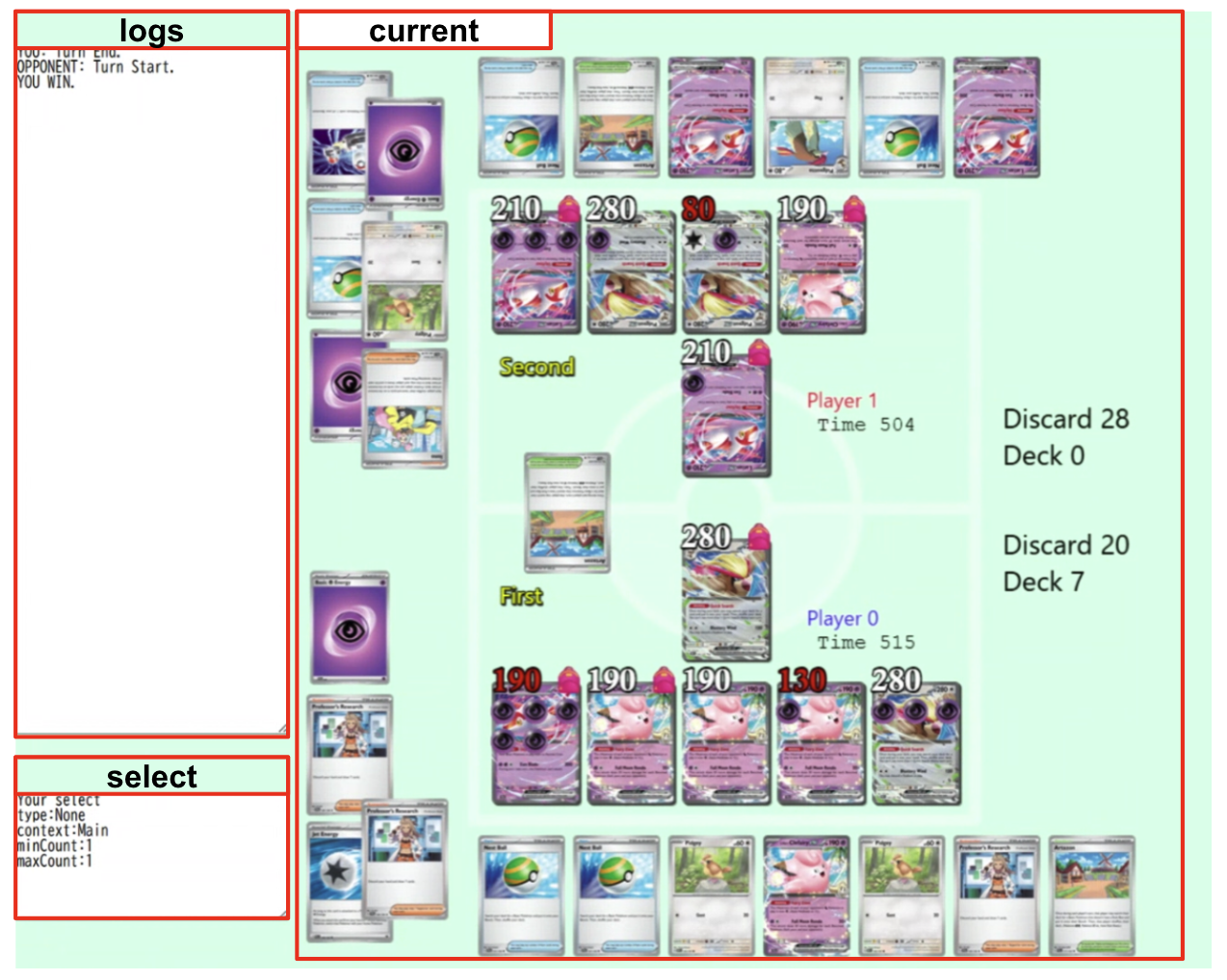
The Observation object contains three main components:
logs: Event logs of past actions and game eventscurrent: Current board state information (player states, turn information, etc.). This can beNoneduring the initial deck selection phase.select: Information about available choices. The index of Options contained in this object is used as Actions. This can beNoneduring the initial deck selection phase.
Observation.current Structure
Observation.current corresponds to the State class and contains the following fields:
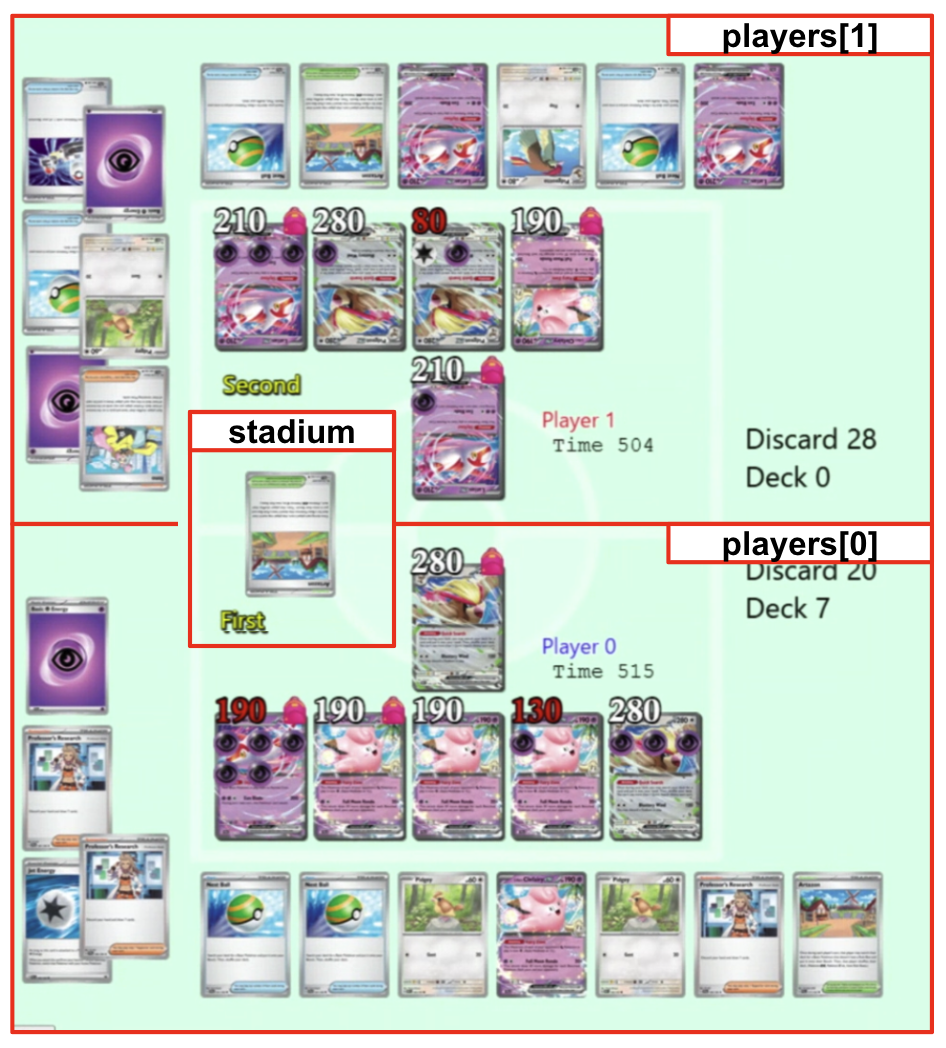
players: Each player’s state (PlayerState)stadium: Current stadium card (Card)Game progression information such as turn count, first/second player, supporter/stadium/energy usage, retreat state, and game results
PlayerState Structure
PlayerState represents each player’s board state and primarily contains the following fields:
active: Active Pokémon in the battle position (Pokemon). The list size is 0 or 1, and the element can beNoneif the card is face-down.bench: List of Benched Pokémon (maximum of 5)hand: Hand cards (visible for self only, opponent shows count only)prize: Prize cards. Face-down cards are represented asNone. The first element is the bottom prize and the last element is the top prize.deckCount: Remaining cards in deckdiscard: Discard pilehandCount: Number of cards in handbenchMax: Maximum bench size (typically 5)poisoned,burned,asleep,paralyzed,confused: Status condition flags
![Field mapping diagram for players[0]/[1]](_images/playerstate_mapping.png)
API Overview
Function Library for Simulation and Battle Control
Sim Module
A collection of APIs for retrieving card information and exploring state transitions. Primarily defined in api.py and sim.py.
Card Data API
all_card_data()Retrieves metadata for all available cards (name, HP, energy, etc.).all_attack()Retrieves information for all available attacks (description, damage, required energy).
Search API
search_begin(...)Initializes search state based on an Observation and generates a SearchState.search_step(search_id, select)Advances the search state by one step with the specified choice.search_end()Ends the current search state and releases memory.search_release(search_id)Explicitly destroys a specific search ID.
Game API
A collection of functions for controlling battle start, selection, and end. Primarily defined in game.py.
battle_start(deck0, deck1)Starts a battle using two decks (60 cards each) and returns a tuple of(Observation | None, StartData). If initialization fails, the observation isNoneandStartDatacontains the error information.battle_select(select_list)Advances the board state by one step based on player selections and returns a new Observation.battle_finish()Ends the current battle (releases memory).visualize_data()Outputs the current board state as a human-readable string (for debugging).
Getting Started
Running a Battle with Minimal Setup
You can run a random-choice battle with a minimal environment by preparing the following two files.
agent.py
import random

# Example agent that selects cards at random.
def agent(obs_dict: dict) -> list[int]:
    return random.sample(
        list(range(len(obs_dict["select"]["option"]))), obs_dict["select"]["maxCount"]
    )
deck.csv
List 60 card IDs, one per line:
278
278
...
7
7
> Card IDs can be obtained using all_card_data().
Example Test Script
from kaggle_environments import make
from agent import agent

with open("deck.csv") as f:
    deck = [int(line) for line in f.readlines() if line.strip()]

env = make("cabt", configuration={"decks": [deck, deck]})
env.run([agent, agent])

with open("result.html", "w") as f:
    f.write(env.render(mode="html"))

print("Simulation finished.")